Multitech MT1932ZDXI Informacje Techniczne Strona 151
- Strona / 196
- Spis treści
- BOOKMARKI

- Systems Management from an 1
- NT Server Point of View 1
- September 1996 1
- Contents 5
- .................. 179 7
- ..................... 180 7
- Contents v 7
- How This Redbook Is Organized 9
- Comments Welcome 10
- Copyright IBM Corp. 1996 1 11
- 1.3 Installation under NT 13
- NETFINST 16
- 1.5 Hints and Tips 20
- Copyright IBM Corp. 1996 11 21
- 2.1.1.1 System Information 22
- Figure 15. Slots and Adapter 24
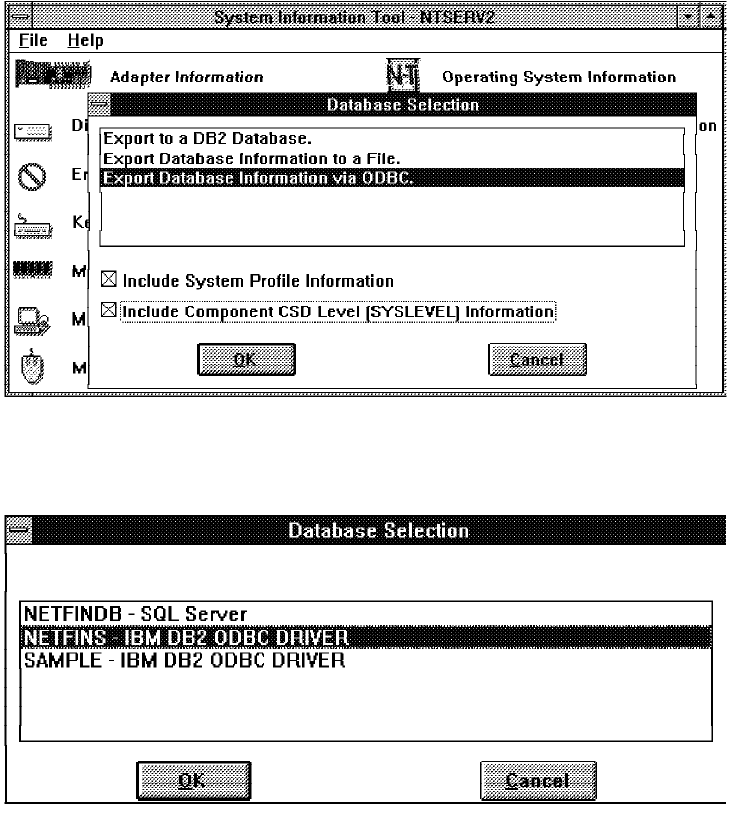
- Figure 16. Database Selection 25
- 2.1.1.3 Software Inventory 26
- Figure 20. Software Inventory 27
- 2.1.1.4 DMI Services 28
- Figure 23. DMI Functions 29
- 2.1.1.5 Security Manager 30
- Figure 26. Security Manager 31
- 2.1.1.6 RAID Manager 32
- Figure 30. PFA Icon 33
- 2.1.1.9 ECC Memory Service 35
- 2.1.1.10 System Monitor 36
- Figure 36. Monitoring 37
- 2.1.1.12 Alert Manager 40
- NETBIOS::4000700CE246 42
- Protocol Address 42
- Figure 44. Alert Log Menu 43
- 2.1.1.13 Process Manager 44
- Figure 48. Add Process Alerts 45
- 2.1.1.14 Serial Connection 46
- Figure 52. Modem Definition 48
- 2.1.2.1 Remote System Manager 49
- Figure 55. Group Management 50
- Figure 56. Group View - Icons 51
- 2.1.2.2 Event Scheduler 52
- Figure 62. Output Definitions 54
- 2.1.2.3 File Transfer 56
- 2.1.2.4 Power-On Error Detect 57
- Figure 70. POED Entry 59
- Figure 71. POED Entry Details 59
- 2.1.2.5 Remote Session 60
- 2.1.2.6 Screen View 61
- 2.1.2.7 Web Manager 62
- Figure 78. Web Manager Remote 63
- 2.2.4 Windows NT Event Viewer 69
- 2.2.5 Windows NT Diagnostics 70
- Hardware 72
- Security 72
- Software 72
- by seats 79
- 2.2.9.1 Export Service 80
- 2.2.9.2 Import Service 83
- 2.3.1.1 Automatic Login 87
- 2.3.2 Process Management 90
- Figure 106. TLIST.EXE Output 91
- Figure 107. TLIST.EXE Output 91
- 2.3.3 Performance Monitoring 92
- 2.3.4 Command Scheduler 94
- AT /? in a 95
- 2.3.5.1 Net Watch 96
- 2.3.5.2 Browser Monitor 97
- 2.3.5.3 Domain Monitor 99
- 2.3.6.1 NT Registry Guide 102
- Chapter 3. Alert Flows 105
- 3.2 View Alert Log 106
- Chapter 3. Alert Flows 97 107
- Severity 108
- Application ID 108
- Application Alert Type 108
- Alert Type 108
- 3.2.2 Alert Profiles 109
- 3.2.3 Severity 110
- 3.2.4 Alert Actions 110
- Chapter 3. Alert Flows 101 111
- 3.2.5 Command Line Interface 112
- Figure 129. Generated Alert 113
- 3.2.6.1 Security Manager 114
- 3.2.6.2 System Monitor 115
- Figure 131. Visible Monitors 116
- Chapter 3. Alert Flows 107 117
- 3.2.6.3 Power-On Error Detect 118
- 3.2.6.5 Critical File Monitor 119
- 3.2.6.6 Process Manager 120
- 3.2.6.7 Remote System Manager 121
- 3.2.6.8 Service Manager 123
- 3.3.1 Alert Generating 124
- Chapter 3. Alert Flows 115 125
- 3.3.2 Alert Forwarding 126
- Chapter 4. Managing Clients 127
- 4.2 Functions and Differences 128
- 4.2.2 OS/2 Warp 128
- 4.2.3 NetWare 128
- 4.3 Summary 129
- DB2ICRT DB2NETFS 134
- Server Setup 140
- Figure 159. Microsoft SQL 6.5 141
- Enterprise Manager 147
- Chapter 6. Webability 155
- Chapter 6. Webability 147 157
- Chapter 6. Webability 149 159
- Figure 178. Webability 161
- 6.3 Internet Client Functions 163
- Chapter 6. Webability 155 165
- Figure 183. Group Details 167
- Chapter 6. Webability 159 169
- Chapter 6. Webability 161 171
- Chapter 6. Webability 163 173
- Chapter 6. Webability 165 175
- C.1 OS/2 System Monitors 181
- C.2 Windows NT Monitors 181
- C.3 NetWare 3.x/4.x Monitors 182
- C.5.2 Lexmark International 182
- C.5.3 BMC Software 183
- Appendix D. Special Notices 185
- E.2 Redbooks on CD-ROMs 187
- E.3 Other Publications 187
- How To Get ITSO Redbooks 189
- IBM Redbook Order Form 191
- (continued) 194
- SG24-4723-00 196
Powiązane produkty i podręczniki dla Networking Multitech MT1932ZDXI
 (115 strony)
(199 strony)
(126 strony)
(197 strony)
(115 strony)
(199 strony)
(126 strony)
(197 strony)
 (10 strony) (116 strony)
(40 strony)
(10 strony) (116 strony)
(40 strony)
© 2020, manymanuals.pl. Wszelkie prawa zastrzeżone. | 0.038 s |
 Manymanuals.com
 Manymanuals.de
 Manymanuals.fr
 Manymanuals.it
 Manymanuals.pl
 Manymanuals.cz
 Manymanuals.es
 Manymanuals-pt.com
Komentarze do niniejszej Instrukcji